
The Profile-to-Permission-Set Shift: Security Risks in the Migration
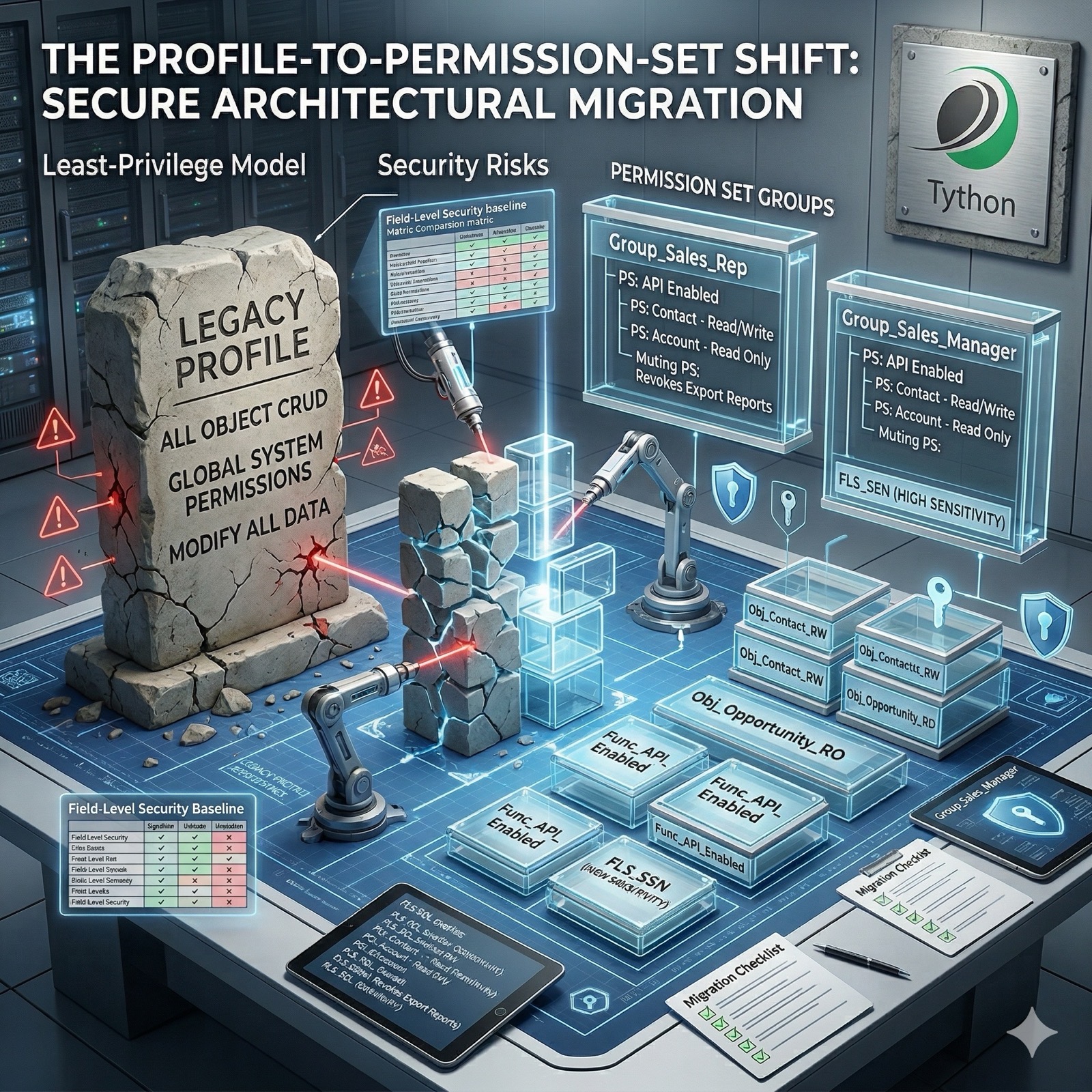
We’ve previously discussed permission set overprivileging and compliance logging gaps. Those topics dealt with auditing what already exists. This one is about what comes next: restructuring your org’s permission model around permission sets and permission set groups.
Salesforce has been pushing this direction for years. Permission sets are the recommended model for managing access, and orgs that are still relying heavily on custom profiles are carrying architectural debt that makes least-privilege access harder to achieve. For many orgs, this migration is the biggest security architecture change they’ll face this year. And if it’s handled as a lift-and-shift–converting profiles into equivalent permission sets–the result will be the same overprivileged access model in a different container.
Why Profiles Are a Security Problem
A single profile controls object CRUD access, field-level security, system permissions, login restrictions, page layout assignments, and more. Because profiles are one-per-user, teams create broad profiles that cover every possible access need a role might have. Over time, those profiles grow. Permissions get added for edge cases and are never removed.
The result is coarse-grained access that’s difficult to audit and impossible to narrow without affecting every user on the same profile.
Permission sets fix this by design. They’re additive, stackable, and can be scoped to a single purpose. But only if you use them that way.
The Migration Anti-Patterns
The most common mistakes we see:
- One-to-one conversion. Taking a profile’s full permission scope and converting it into a single equivalent permission set. This preserves every problem the profile had–now it’s just in a different format.
- No decomposition. Failing to break the profile into smaller, purpose-built permission sets. A profile that grants API access, report export, and Modify All Data should become three separate permission sets–each assigned only to the users or integrations that actually need it.
- Ignoring field-level security. FLS is embedded in profiles and must be explicitly recreated in permission sets. If you skip this step, users may silently lose or gain field access during migration.
- Skipping sandbox testing. Permission changes can break automation, integrations, and user workflows. Testing in a sandbox with production-like user assignments is not optional.
How to Structure Permission Sets
A clean permission set architecture follows one principle: each permission set should represent one capability or one data access need.
- Functional permission sets: API Enabled, Report Export, Manage Users
- Object access permission sets: Contact Read/Write, Opportunity Read Only, Case Full Access
- Integration permission sets: One per vendor, scoped to exactly what the integration requires
Then use Permission Set Groups to bundle these into role-based collections. A “Sales Rep” group might include Contact Read/Write, Opportunity Read/Write, and Report Access. A “Sales Manager” group adds Export Reports. This is granular, auditable, and easy to modify without side effects.
Deeper Dive
Permission Set Group Architecture
Permission Set Groups are the organizational layer that makes granular permission sets manageable. Without them, assigning ten individual permission sets to every new hire in a role becomes an administrative burden. With them, you assign one group.
The recommended structure:
Permission Set Group: "Sales Representative"
├── PS: API Enabled
├── PS: Contact - Read/Write
├── PS: Opportunity - Read/Write
├── PS: Account - Read Only
├── PS: Report Access
└── Muting Permission Set: Revokes Export Reports
Permission Set Group: "Sales Manager"
├── PS: API Enabled
├── PS: Contact - Read/Write
├── PS: Opportunity - Read/Write/Delete
├── PS: Account - Read/Write
├── PS: Report Access
├── PS: Export Reports
└── PS: Manage Subordinate Users
Each permission set is a self-contained unit. Adding a new capability to all sales reps means adding one permission set to one group–not touching individual user assignments.
Naming Conventions
Consistent naming makes audits dramatically easier. A recommended pattern:
- Functional:
Func_API_Enabled,Func_Report_Export - Object access:
Obj_Contact_RW,Obj_Opportunity_RO,Obj_Case_Full - Integration:
Int_VendorX_API,Int_DataSync_Contacts - Groups:
Group_Sales_Rep,Group_Sales_Manager,Group_Support_Agent
The prefix makes it immediately clear what category each permission set belongs to and whether it was purpose-built or inherited from a legacy profile migration.
Muting Permission Sets for Vendor Packages
Managed packages often include their own permission sets, and you can’t modify them. A vendor’s permission set might include Export Reports, API Enabled, and access to objects your org doesn’t want that vendor touching.
Muting Permission Sets solve this. A Muting Permission Set is assigned to a Permission Set Group and revokes specific permissions from the combined set:
Permission Set Group: "Vendor X - Production"
├── Vendor X Managed Permission Set (from package)
└── Muting PS: Revokes Export Reports, Revokes Modify All Data
The vendor’s integration still functions with the permissions it needs, but the permissions you don’t want it to have are removed. This is the cleanest way to apply least privilege to vendor integrations without forking or fighting managed packages.
To create a Muting Permission Set:
Setup > Permission Set Groups > [Select Group] > Muting Permission Set in Group > NewThen enable the permissions you want to mute (the UI is inverted–you’re selecting which permissions to suppress).
FLS Migration Strategies
Field-level security is where most migrations go wrong. In profiles, FLS is a matrix of fields and visibility settings embedded directly in the profile metadata. When you move to permission sets, you need to explicitly define FLS in each permission set that grants object access.
Step 1: Export Current FLS from Profiles
Query the existing FLS assignments:
SELECT ParentId, Parent.Name, Parent.IsOwnedByProfile,
       SObjectType, Field, PermissionsRead, PermissionsEdit
FROM FieldPermissions
WHERE Parent.IsOwnedByProfile = true
ORDER BY Parent.Name, SObjectType, Field
Export this data. It’s your baseline for what each profile currently grants at the field level.
Step 2: Map FLS to Permission Sets
For each object access permission set you create, define the appropriate FLS. The key decision for each field is:
- Does a user with this permission set need to read this field?
- Does a user with this permission set need to edit this field?
- Is this field sensitive enough that access should be a separate permission set?
For highly sensitive fields (SSN, salary, health data), consider creating dedicated FLS permission sets that can be assigned independently of object access. This way, a user can have Contact Read/Write without seeing the Contact’s Social Security Number.
Step 3: Validate with Queries
After building your permission sets in a sandbox, verify FLS assignments:
SELECT Parent.Name, SObjectType, Field,
       PermissionsRead, PermissionsEdit
FROM FieldPermissions
WHERE Parent.IsOwnedByProfile = false
AND SObjectType = 'Contact'
ORDER BY Parent.Name, Field
Compare this output against your baseline. Gaps indicate fields that weren’t carried over. Unexpected additions indicate FLS that’s broader than intended.
Migration Checklist
A step-by-step approach for the migration:
- Inventory all profiles. Document which profiles exist, how many users are on each, and what permissions each grants (object, field, system).
- Classify permissions. Group the permissions from each profile into categories: functional, object access, and integration.
- Design permission sets. Create purpose-built permission sets for each category. Resist the urge to create one-to-one equivalents.
- Design permission set groups. Map each role (not profile) to a Permission Set Group that bundles the appropriate permission sets.
- Build in sandbox. Create all permission sets and groups in a full-copy sandbox.
- Migrate FLS. Rebuild field-level security in the new permission sets using the profile FLS export as a baseline.
- Test. Assign the new permission set groups to test users and validate: Can they access what they need? Can they not access what they shouldn’t? Do automations, reports, and integrations still work?
- Deploy to production. Roll out in phases–one role or department at a time–with a rollback plan.
- Clean up profiles. Once all users are on permission set groups, strip the custom profiles down to a minimal baseline. Don’t delete them immediately–keep them as a fallback for the first quarter.
- Document and govern. Record the permission set architecture, assign ownership for each group, and establish a review cadence.
Ongoing Governance
The migration is only valuable if permissions don’t drift back. Build these practices into your operations:
- Quarterly access reviews: Compare current permission set assignments against the documented architecture. Flag any new assignments that weren’t approved through the change process.
- New user onboarding: New users should receive a Permission Set Group assignment–not ad hoc individual permission sets. If an onboarding process adds individual permission sets, it’s working around the architecture.
- Vendor access reviews: Every vendor contract renewal should trigger a re-audit of the vendor’s integration user and permission sets.
- Permission set creation governance: New permission sets should require a documented justification and approval. Without this, you’ll end up with the same sprawl problem within a year.
The Bottom Line
The profile-to-permission-set migration is an opportunity to rebuild your access model from scratch. But it’s only a security improvement if you decompose access into purpose-built permission sets rather than replicating the same broad permissions in a new format.
If your org is planning or in the middle of this migration, treat it as a security architecture project–not an admin task.
Book a 15-Minute Security Strategy Call
If you’re managing permissions across a complex org–or navigating the profile-to-permission-set migration–Permissions Assistant (now Data Defense) can help you audit your current permission landscape, identify overprivileged users and integrations, and manage permission sets and field-level security at scale.
Reference(s):
https://help.salesforce.com/s/articleView?id=sf.perm_sets_overview.htm
https://help.salesforce.com/s/articleView?id=sf.perm_set_groups.htm
https://help.salesforce.com/s/articleView?id=sf.admin_userprofiles.htm
https://help.salesforce.com/s/articleView?id=sf.perm_set_groups_muting.htm