
SalesforceSecurityIntegrations
The JWT OAuth Flow: The Gold Standard for Salesforce Server-to-Server Integrations
In recent editions of Salesforce Security Signal, we’ve mentioned the need for a deeper dive into secure server-to-server authentication. Here it is.
If your vendors aren’t using the JWT Bearer OAuth Flow for server-to-server integrations, they’re likely relying on methods that put your data at unnecessary risk. Let’s break down why JWT is the gold standard and what you should be demanding from every vendor with API access to your org.
The Problem with Other Approaches
Most integrations involve some form of token exchange that introduces risk:
- Session Hijacking: Vendors steal session IDs and replay them from external servers. No audit trail, no accountability.
- Refresh Token Flows: Vendors store long-lived refresh tokens on their servers. If that server is compromised, attackers can silently generate new access tokens indefinitely–exactly what happened in the Salesloft Drift data breach.
- Username-Password Flow: Vendors store actual user credentials. This should go without saying, but never allow this.
All three of these methods share a common flaw: they trust the vendor’s infrastructure with persistent credentials that can be exploited if compromised.
Why JWT Is Different
The JWT Bearer flow employs a zero-trust model. Instead, it relies on asymmetric cryptography:
- The vendor generates a private key and keeps it on their server.
- You upload the corresponding public certificate to an External Client App in your Salesforce org.
- When the vendor needs API access, they sign a JWT (JSON Web Token) with their private key and send it to Salesforce.
- Salesforce verifies the signature using the public certificate and issues a short-lived access token.
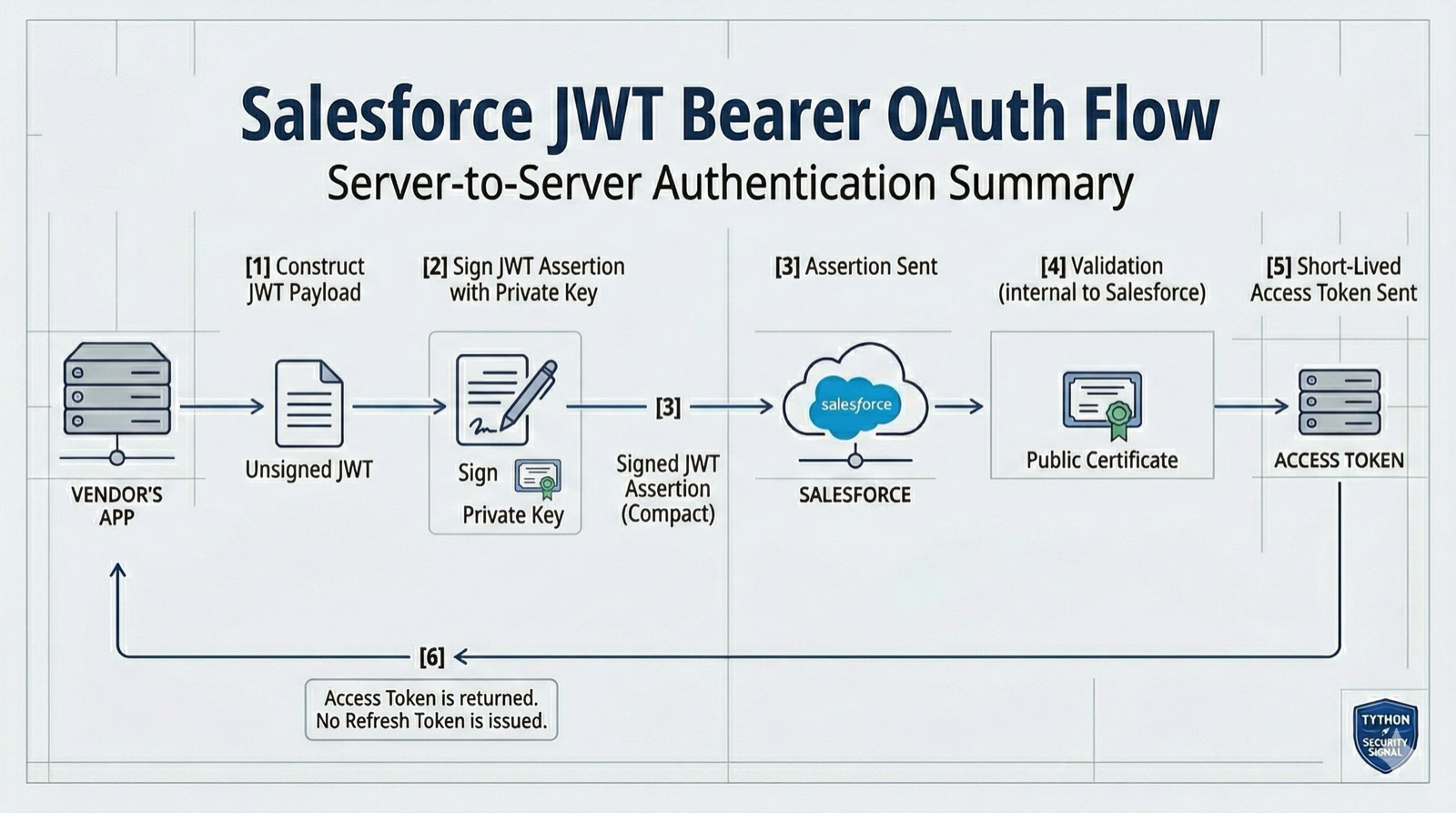
There are no refresh tokens stored. There are no user credentials exchanged. If the vendor’s server is compromised, you can immediately revoke access by deleting the certificate from the External Client App–no passwords to rotate, no tokens to hunt down.
Many vendor partners will–and should–deliver their integration via a managed package containing an External Client App. This gives you an additional layer of control: if the vendor is compromised, you can uninstall the entire package and cleanly sever access in one step.
What to Look for in Your Org
Want to see which apps are configured in your org and what flows they’re using? Some vendors may still use Connected Apps, while Salesforce now pushes External Client Apps as the standard.
Check both Setup > Connected Apps > Manage Connected Apps and Setup > External Client App Manager.
For each app, check:
- Permitted Users: Is it set to “Admin approved users are pre-authorized”? It should be, for server-to-server flows.
- OAuth Scopes: Are they limited to what the vendor actually needs, or did they request
fullaccess? - Certificate: Is a digital certificate uploaded? If not, the app isn’t using the JWT flow.
If you see a Connected App or External Client App with broad scopes, no certificate, and “All users may self-authorize”–that’s a red flag worth investigating.
What to Demand from Your Vendors
When evaluating vendor integrations, ask these questions:
- What OAuth flow do you use? The answer should be “JWT Bearer” for any server-to-server integration.
- Do you store refresh tokens? The answer should be “No.”
- What OAuth scopes does your integration require? It should be the minimum necessary. Watch out for
full,refresh_token, oroffline_access. - Is your integration delivered via a managed package? Vendors should package their External Client App in a managed package, giving you the ability to uninstall and fully revoke access if needed.
- Can you provide architecture documentation? Any credible vendor should be willing to explain how they authenticate with your org.
If a vendor can’t answer these questions clearly, that’s a signal they may not be handling your security with the care it deserves.
Deeper Dive
How the JWT Bearer Flow Works Under the Hood
Here’s the full technical sequence of the JWT Bearer flow:
Step 1: The vendor constructs a JWT claim set. This is a JSON payload containing:
{
  "iss": "3MVG9...",
  "sub": "[email protected]",
  "aud": "https://login.salesforce.com",
  "exp": 1709078400
}iss(Issuer): The External Client App’s Consumer Key (also called Client ID).sub(Subject): The Salesforce username the vendor is requesting access on behalf of. This should be a dedicated integration user, never a real person’s account.aud(Audience): The Salesforce token endpoint.exp(Expiration): A short-lived timestamp. Salesforce requires this to be no more than 5 minutes from the current time.
Step 2: The vendor signs the JWT. Using their private key, the vendor signs the claim set with the RS256 algorithm (RSA with SHA-256). This produces a compact, URL-safe string.
Step 3: The vendor sends the signed JWT to Salesforce’s token endpoint.
POST https://login.salesforce.com/services/oauth2/token
grant_type=urn:ietf:params:oauth:grant-type:jwt-bearer
assertion=<signed_JWT>
Step 4: Salesforce validates the JWT. Salesforce checks:
- Is the
issa valid Consumer Key for an active External Client App? - Does the External Client App have a certificate uploaded?
- Does the JWT signature match the public certificate?
- Is the
expwithin the 5-minute window? - Is the
subuser authorized for this External Client App?
Step 5: Salesforce issues an access token. If everything checks out, Salesforce returns a short-lived access token. No refresh token is issued.
Dedicated Integration Users
A critical best practice for JWT flows is to create a dedicated integration user rather than running the integration under a real user’s account. This provides:
- Clear audit trail: All API activity from the vendor shows up under a distinct username in your login history and event logs.
- Isolated permissions: You can assign the integration user a purpose-built profile and permission set with only the minimum object and field access the integration requires.
- Independent lifecycle: Deactivating the integration user immediately kills the vendor’s access without affecting any real user.
Create a permission set specifically for the integration with only the necessary CRUD permissions, assign it to the integration user, and reference that user as the sub in the JWT claim set.
Certificate Management
The security of the JWT flow hinges on proper certificate management. If the vendor delivers their integration via a managed package, certificate management is the vendor’s responsibility–not yours. That’s actually a good thing, as long as the vendor follows sound practices. Here’s what to look for either way:
- Key length: At least 2048-bit RSA keys. 4096-bit is preferred.
- Rotation: A defined key/certificate rotation schedule.
- Storage: The private key should be stored in a secure vault (AWS KMS, Azure Key Vault, HashiCorp Vault, etc.)–never in source code, environment variables, or unencrypted config files.
- Expiration: Certificate expiration dates should be monitored. An expired certificate will break the integration silently.
Ask your vendors about their key management practices. If they can’t articulate where and how they store the private key, that’s a concern–whether they manage the certificate or you do.
Scoping Access with External Client App Policies
Beyond the OAuth scopes you select when configuring the External Client App, Salesforce provides additional policy controls:
- IP Relaxation: Set to “Enforce IP restrictions” to ensure the JWT can only be exchanged from the vendor’s known IP ranges.
- Session Policies: Set session timeout values appropriate for an integration (shorter is generally better).
- Permitted Users: Always use “Admin approved users are pre-authorized” for server-to-server flows, and assign the specific integration user via a permission set.
These policies ensure that even if a JWT were somehow intercepted or the private key compromised, the attacker would still need to originate the request from an approved IP address and target an authorized user.
The Bottom Line
Security isn’t just about your internal users; it’s also about the vendors you’ve granted API access to. If they aren’t using secure OAuth flows, they are putting your data at risk.
The best way to prevent falling victim to a supply chain attack is employing a zero trust strategy when dealing with vendor integrations.
The JWT Bearer flow exists specifically to solve the trust problem with server-to-server integrations. It eliminates persistent credentials, provides clean revocation paths, and aligns with zero trust principles.
Every CISO and Salesforce admin should be making JWT adoption a requirement for vendors–not a nice-to-have.
If your vendors are still relying on session hijacking, refresh tokens, or username-password flows, it’s time to have a conversation.
If you need help auditing your External Client Apps or establishing vendor security requirements, we can help.
Book a 15-Minute Security Strategy Call
Reference(s):
https://help.salesforce.com/s/articleView?id=sf.remoteaccess_oauth_jwt_flow.htm
https://developer.salesforce.com/docs/atlas.en-us.sfdx_dev.meta/sfdx_dev/sfdx_dev_auth_jwt_flow.htm