
Shield Encryption Gaps: What Platform Encryption Doesn't Actually Protect
In previous editions of Salesforce Security Signal, we’ve covered compliance logging gaps and permission set overprivileging. Those topics deal with visibility and access. Today we’re looking at a tool many orgs invest in but few configure correctly: Salesforce Shield Platform Encryption.
Shield Platform Encryption is often treated as a checkbox–enable it, encrypt some fields, and move on. But the gap between what teams think is protected and what’s actually protected is significant. If you’re relying on Shield encryption without understanding its limitations, you may be carrying risk you think you’ve already mitigated.
What Platform Encryption Actually Does
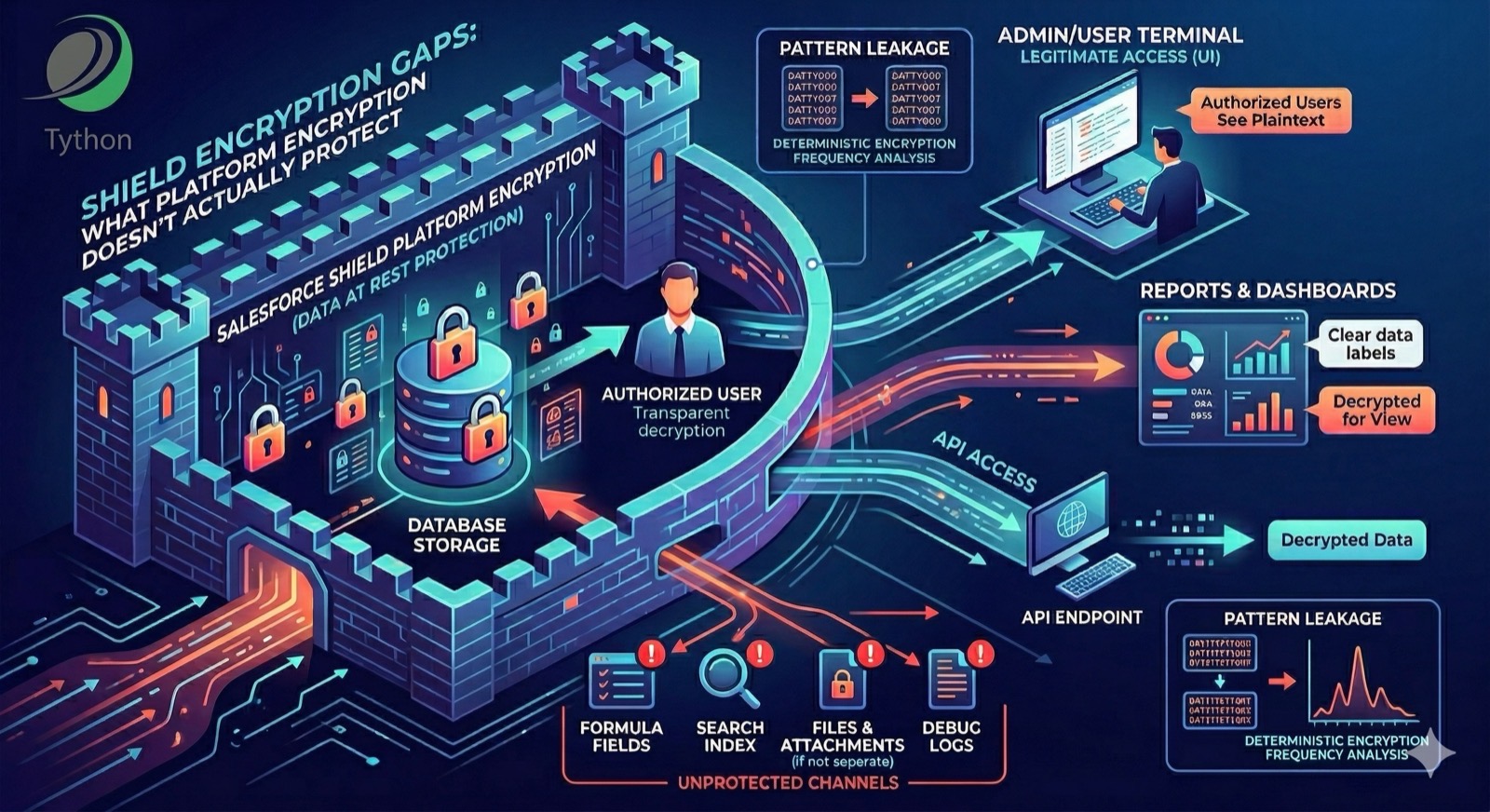
Platform Encryption encrypts field data at rest in the Salesforce database. When a user or API reads the data, Salesforce decrypts it transparently. This means encryption protects against a specific threat: unauthorized access to the underlying database storage. It does not protect data from anyone who has legitimate access to the org through the UI, API, or reports.
This is an important distinction. Encryption at rest is a compliance control (required by HIPAA, PCI-DSS, and others), not an access control. If a user has field-level security to see a field, they see the decrypted value–whether the field is encrypted at rest or not.
Deterministic vs. Probabilistic: The Trade-Off Most Orgs Get Wrong
Platform Encryption offers two encryption schemes:
- Deterministic encryption allows equality filtering and matching on encrypted fields. The same plaintext value always produces the same ciphertext for a given field, object, and org. This means SOQL
WHEREequality clauses and duplicate rules continue to work. However,GROUP BY,ORDER BY,LIKE, and aggregate functions on encrypted fields have limited or no support even with deterministic encryption. - Probabilistic encryption is stronger–the same plaintext value produces different ciphertext each time. But it breaks filtering, grouping, unique constraints, and
WHEREclause matching on encrypted fields.
Most orgs default to deterministic encryption because it doesn’t break existing functionality. But deterministic encryption is weaker: it’s vulnerable to frequency analysis (an attacker who accesses the ciphertext can observe that two records have the same encrypted value, even without decrypting it). For highly sensitive data like Social Security numbers or credit card numbers, this pattern leakage can be a real risk.
The question isn’t which scheme is “better.” It’s whether your org has consciously chosen the scheme based on the sensitivity of the data and the operational requirements–or whether it defaulted to deterministic because probabilistic broke something.
What Encryption Doesn’t Cover
Several categories of data are outside Platform Encryption’s scope:
- Standard fields on most standard objects – Platform Encryption supports a limited set of standard fields (Name, Email, Phone on certain objects). Many standard fields cannot be encrypted at all.
- Formula fields – Formula fields are computed dynamically, so there’s no stored value to encrypt. But formulas that reference encrypted fields expose the decrypted values in their computed results, making them a channel for accessing encrypted data without going through the encrypted field directly.
- Files and Attachments – Platform Encryption supports files and attachments, but file/attachment encryption is a separate setting from field encryption and must be explicitly enabled. It’s not included automatically when you encrypt fields.
- Search index – Search indexes store data in plaintext by default, even when the underlying fields are encrypted. Salesforce offers search index encryption as a separate feature, but it must be explicitly enabled. If it’s not, search index files can expose the values of fields you thought were protected.
- Reports and dashboards – Encrypted data that appears in reports and dashboards is decrypted for display. Encryption does not restrict what users with field-level access can see in reports.
- Debug logs – If encrypted field values appear in debug logs, they’re stored in plaintext in the log.
Common Misconfigurations
The most frequent mistakes we see:
- Encrypting fields that break critical automation. Probabilistic encryption on a field used in a SOQL
WHEREclause will cause the query to fail or return no results. Teams encrypt fields without auditing their Apex, Flows, and reports first. - Assuming encryption = access control. Encrypting a field doesn’t prevent a user with FLS from seeing it. Access control is handled by profiles, permission sets, and sharing–not encryption.
- Not rotating tenant secrets. Salesforce generates tenant secrets to derive encryption keys. If you never rotate them, a compromised key material has unlimited exposure time.
- Ignoring the “Encrypt Existing Data” step. Enabling encryption on a field only encrypts new records. Existing records remain unencrypted until you run the background encryption service–which requires explicit action.
Deeper Dive
How Platform Encryption Key Management Works
Understanding the key hierarchy is essential to configuring Shield encryption correctly.
Salesforce uses a three-layer key hierarchy:
- Master Secret – Managed entirely by Salesforce. You never see or interact with it. It’s stored in a Hardware Security Module (HSM) and is used to derive the next layer.
- Tenant Secret – Generated by your org (or provided by you, if using Bring Your Own Key). Combined with the Master Secret to produce the derived data encryption key.
- Derived Data Encryption Key – The actual key used to encrypt and decrypt your data. It’s never stored–it’s derived on demand from the Master Secret and Tenant Secret combination.
This architecture provides defense in depth: the Master Secret and Tenant Secret are stored separately, so a compromise of one storage layer doesn’t expose the full key material. However, Salesforce as the platform operator has access to both–the Master Secret in their HSM infrastructure and the Tenant Secret in your org’s storage. Standard Platform Encryption does not prevent Salesforce from deriving the encryption key. If your threat model requires that the platform operator cannot access your key material at rest, Cache-Only Keys (covered below) are the only option that provides that guarantee.
Tenant Secret Rotation
Tenant secrets should be rotated regularly. When you rotate a tenant secret:
- A new tenant secret is generated (or uploaded, for BYOK).
- New data is encrypted with a key derived from the new tenant secret.
- Existing data remains encrypted with the old derived key until you explicitly re-encrypt it.
- Old tenant secrets are retained (in an archived state) so existing data can still be decrypted.
To rotate via Setup:
Setup > Platform Encryption > Key Management > Generate Tenant SecretAfter generating the new secret, run the background encryption service to re-encrypt existing data with the new key:
Setup > Platform Encryption > Encryption Statistics > Encrypt Existing DataThis is a background process that runs during off-peak hours. For large orgs, it can take days to complete. Monitor progress in the Encryption Statistics page.
Rotation Cadence
There’s no universal standard, but a reasonable baseline:
- Quarterly rotation for orgs handling PCI or HIPAA data
- Annual rotation for general compliance (SOC 2)
- Immediate rotation if a tenant secret is suspected of being compromised, or if an admin who had access to key management leaves the organization
Bring Your Own Key (BYOK)
For orgs that need to control their own key material, Salesforce supports Bring Your Own Key. Instead of Salesforce generating the tenant secret, you generate it externally and upload it.
How BYOK Works
- Generate a 256-bit AES key using your own HSM or key management system.
- Wrap (encrypt) the key using Salesforce’s public certificate.
- Upload the wrapped key via Setup or the API.
Setup > Platform Encryption > Key Management > Bring Your Own Key > Upload Tenant SecretBYOK gives you:
- Key custody – Your security team controls the key material, not Salesforce.
- Key destruction capability – You can archive or destroy the tenant secret on both sides–your external copy and the Salesforce-stored copy (via Setup > Key Management). Once destroyed on both sides, data encrypted with that key becomes permanently unrecoverable. This is relevant for data destruction requirements in GDPR and similar regulations.
- Compliance evidence – Some frameworks require that the data controller (you) manage the encryption keys, not the data processor (Salesforce).
BYOK Considerations
- BYOK adds operational complexity. You’re responsible for key backup, rotation, and disaster recovery of your key material.
- If you lose your BYOK tenant secret and Salesforce’s copy is destroyed, your encrypted data is permanently unrecoverable.
- BYOK tenant secrets follow the same rotation process as Salesforce-generated ones.
Cache-Only Keys
Salesforce also offers Cache-Only Keys, a stricter variant of BYOK where Salesforce does not persist the tenant secret at all. The key exists only in the Salesforce application cache and must be re-supplied (via an external key service) after any cache eviction or service restart.
This provides the strongest key control:
- Salesforce never stores your key on disk.
- If the cache is cleared, encrypted data is inaccessible until the key is re-supplied.
- You can revoke access to your data at any time by stopping the key service.
Cache-Only Keys are appropriate for orgs with strict data sovereignty or regulatory requirements where key persistence at the processor is not acceptable. They come with operational overhead: your key service must be highly available, or users will lose access to encrypted data during outages.
Auditing Your Encryption Configuration
Before assuming your encryption setup is correct, run through this checklist:
1. Inventory Encrypted Fields
Setup > Platform Encryption > Encryption PolicyReview which fields are encrypted and whether they use deterministic or probabilistic encryption. Cross-reference with your data classification policy–fields containing the most sensitive data (SSN, financial account numbers, health records) should be encrypted with the strongest scheme that operational requirements allow.
2. Test Functional Impact
For each encrypted field, verify:
- SOQL queries that filter on the field still return expected results (probabilistic encryption will break these)
- Duplicate rules that match on the field still function
- Reports that group or filter on the field still work
- Flows that reference the field behave correctly
- Apex code that performs string operations on the field value (e.g.,
LIKEqueries, string concatenation for filtering) still functions
3. Verify Background Encryption Status
Setup > Platform Encryption > Encryption StatisticsCheck that existing data has been encrypted. If the statistics show a significant number of unencrypted records, the background encryption service hasn’t completed–or hasn’t been run.
4. Review Tenant Secret History
Setup > Platform Encryption > Key ManagementCheck the last rotation date. If tenant secrets have never been rotated since initial setup, schedule a rotation.
5. Check Permission Sets
The “Manage Encryption Keys” permission controls who can generate, rotate, and destroy tenant secrets. Verify this is limited to a small number of security administrators–not broadly assigned.
Data Masking as a Complementary Control
Encryption at rest and data masking address different problems:
ControlWhat It Protects AgainstHow It WorksPlatform EncryptionUnauthorized database-level accessEncrypts data at rest; transparent decryption for authorized usersData MaskingSensitive data in non-production environmentsReplaces real data with realistic fake data in sandboxesField-Level SecurityUnauthorized field accessHides fields entirely from users who don’t have FLS
Data masking is a separate capability from Platform Encryption. Salesforce Data Mask is a standalone product that replaces sensitive data with realistic fake data in sandboxes–preventing production PII from leaking to lower environments. For masking data in production (e.g., showing “*--1234” instead of a full SSN to certain users), there’s no native Salesforce feature–you’d need custom Lightning components or third-party tools that conditionally render partial values based on the user’s permissions. This addresses the “encryption doesn’t prevent authorized users from seeing data” gap from a different angle than FLS.
For orgs handling sensitive data, the right approach is typically all three: FLS to restrict who can see the field, data masking to limit what authorized users see, and encryption to protect the data at rest.
The Bottom Line
Shield Platform Encryption is a legitimate and sometimes necessary compliance control. But it’s a narrow control that addresses data-at-rest protection–not access control, not data masking, and not a replacement for proper field-level security. Understanding the key hierarchy, choosing the right encryption scheme per field, rotating tenant secrets, and verifying that background encryption has completed are all necessary steps to get actual value from the investment.
If your org has purchased Shield and the encryption configuration hasn’t been reviewed since initial setup, an audit is overdue.
Book a 15-Minute Security Strategy Call
Reference(s):
https://help.salesforce.com/s/articleView?id=sf.security_pe_overview.htm
https://help.salesforce.com/s/articleView?id=sf.security_pe_deterministic_encrypt.htm
https://help.salesforce.com/s/articleView?id=sf.security_pe_byok.htm
https://help.salesforce.com/s/articleView?id=sf.security_pe_byok_cache.htm
https://help.salesforce.com/s/articleView?id=sf.security_pe_rotate_keys.htm