
SalesforceSecurityToolsCompliance
Sandbox Data Is Still Real Data: Data Mask & Seed Goes On-Core
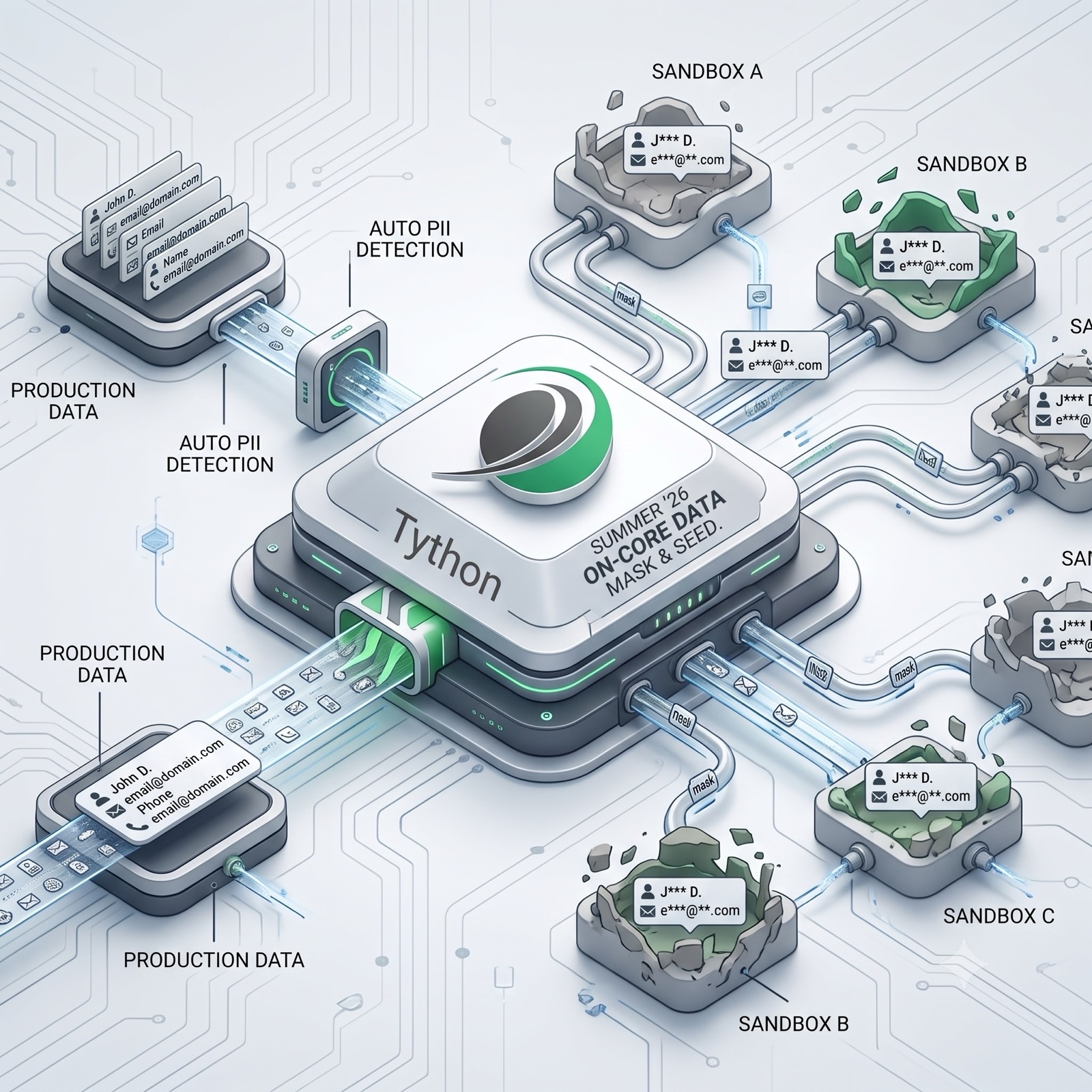
Most security programs pour their energy into production and quietly forget that every sandbox is a copy of that same regulated data — usually with more users, weaker oversight, and contractors who’d never touch the live org. As we covered in Shield Encryption Gaps, encrypting production doesn’t help if the data walks out somewhere else, and sandboxes are one of the most common “somewhere elses.” Summer ’26 makes closing that gap meaningfully easier.
What’s New
Data Mask & Seed is now a core app in Summer ’26, no longer a separately installed managed package. Two things matter for security teams.
First, proactive PII detection is built in. The tool now automatically identifies personally identifiable information across your data, so you no longer have to manually hunt down and tag every sensitive field before you can mask it. That manual step was where most masking projects stalled.
Second, the on-core version automates mock data injection alongside the existing masking, all behind a simpler UI. The goal is sandboxes that are realistic enough to test against but no longer carry live customer PII.
Why It Matters
A full or partial sandbox refresh copies real names, emails, phone numbers, and account data into an environment that often has looser access than production. Developers, QA, and third-party implementation partners frequently have broad access there. That’s a regulated-data exposure under GDPR, CCPA, and FINRA hiding in plain sight — and it rarely shows up in a security review because everyone is looking at production.
The reason masking projects so often never happened wasn’t disagreement that they should; it was friction. Installing a package, manually classifying sensitive fields, and configuring masking rules was enough work that teams deferred it indefinitely. Removing the install step and automating PII discovery takes the most common excuse off the table.
What to Do This Week
- Inventory your sandboxes and note which contain production copies and who has access to each. Unknown sandbox sprawl is the real risk.
- Enable Data Mask & Seed and run the new PII detection against a sandbox to see what sensitive data is actually sitting there.
- Build masking into your refresh process so every new sandbox is masked on creation, not “eventually.” Unmasked-by-default is how PII leaks.
Deeper Dive
The Sandbox Blind Spot
When a sandbox is created or refreshed, Salesforce copies data from production into it. For a Full sandbox, that’s a complete copy of your records; for a Partial Copy, it’s a representative sample. Either way, the data that lands in the sandbox is real: real customers, real contact details, real financial figures, real case histories.
The security problem is that the sandbox does not inherit production’s discipline. Production access is typically tightly scoped, reviewed, and monitored. Sandboxes, by contrast, are working environments. Developers need broad permissions to build. QA needs to see records to test. Implementation partners and contractors are often granted access for the length of a project and sometimes long after. The result is that the same dataset you guard carefully in production is sitting in two, five, or ten other orgs where far more people can read, export, and copy it — and where Event Monitoring and alerting are usually an afterthought, if they exist at all.
This is why sandboxes are a recurring theme in real incidents and audit findings. The data didn’t leak from the hardened production org; it leaked from the forgotten Developer Pro sandbox a former contractor still had a login to. From a regulatory standpoint, the obligation follows the data, not the environment. A CCPA or GDPR exposure in a sandbox is an exposure, full stop.
What Actually Changed in Summer ’26
Data Mask has existed for years, but two friction points kept adoption low. It shipped as a managed package you had to find, install, and configure, and before you could mask anything you had to know what was sensitive — which meant manually reviewing your schema and tagging fields. For an org with hundreds of custom fields across dozens of objects, that classification step alone could sink the project.
Summer ’26 attacks both points. Data Mask & Seed is now on-core, so there’s no package to install and the experience lives natively in Setup behind a simpler UI. More importantly, proactive PII detection now does the classification for you, scanning your data and flagging the personally identifiable fields automatically. You move from “spend two weeks figuring out what to mask” to “review what the platform already found and confirm the rules.”
The seeding side matters too. Automated mock data injection means you can populate a sandbox with realistic-but-synthetic data rather than copying production at all in some workflows, or layering generated data on top of a masked copy. The combination — detect, mask, seed — is the whole lifecycle of getting usable test data without carrying live PII.
The Masking Techniques, and When to Use Each
Data Mask isn’t a single operation; it offers several techniques, and choosing the right one per field is what separates real protection from theater.
Anonymization replaces sensitive values with random characters. It’s the strongest for eliminating the original value, but it can break formats that downstream logic depends on.
Pseudonymization swaps real values for realistic-looking substitutes — a real name becomes a different plausible name. This preserves the look and feel of the data, which matters when you’re testing UI, validation rules, or anything that behaves differently on realistic input.
Pattern matching lets you mask while preserving a value’s structure, useful for fields like phone numbers or IDs where format-dependent code would otherwise fail.
Deletion simply removes the value. Use it for fields that tests don’t need at all — there’s no reason to retain even a masked version of data your sandbox work never touches.
The practical guidance: don’t reach for one technique globally. Map techniques to fields based on what your testing actually requires. Over-anonymize and you’ll get developers turning masking off because the data is unusable; under-mask and you’ve left PII exposed. The new PII detection gives you the field inventory to make those decisions deliberately.
Build It Into the Refresh, Not After
The single most important operational change is making masking automatic on sandbox creation and refresh. The dangerous window is the gap between “production data lands in the sandbox” and “someone remembers to mask it.” If masking is a manual step someone runs later, that window can be days or forever, and during it the sandbox holds unmasked PII accessible to everyone with a login.
Configure masking so it’s applied as part of the refresh workflow, and treat any sandbox that has been refreshed but not yet masked as holding production data — because it does. Document an owner for sandbox masking the same way you’d document one for any production control. An automated mask that nobody confirmed ran is not a control you can rely on at audit time.
What This Doesn’t Solve
Masking sandbox data is necessary, not sufficient. It addresses data-at-rest exposure in non-production copies; it does nothing about who can access those sandboxes in the first place. A masked sandbox with a hundred unnecessary logins is still an oversized attack surface — just one that leaks less when it’s breached. Pair masking with periodic access reviews of every sandbox and prompt deactivation of contractor and former-employee logins.
It also doesn’t cover data that leaves Salesforce entirely — exports to spreadsheets, data loaded into external test systems, or copies pulled by integrations. Masking governs the copy inside the sandbox; your broader data-handling policy has to govern the rest. And as always, confirm the exact entitlement, edition availability, and any limits against the Summer ’26 release notes for your org before you build a compliance commitment around it.
The Bottom Line
For years, the honest reason most orgs ran sandboxes full of unmasked production PII wasn’t that anyone thought it was fine — it was that masking was just enough work to keep getting deferred. Summer ‘26 removes the install step and automates the part everyone dreaded: figuring out what’s sensitive. That doesn’t make sandbox data security automatic, but it removes the last good excuse for skipping it. Your customers’ data is just as real in a sandbox as in production. Now it’s much easier to treat it that way.
Book a 15-Minute Security Strategy Call
Reference(s):
https://www.salesforce.com/blog/platform-summer-26-release/
https://help.salesforce.com/s/articleView?id=platform.data_mask_overview.htm&language=en_US&type=5
https://www.salesforce.com/platform/data-masking/