
Compliance Logging in Salesforce: What the Native Tools Don't Cover
We’ve previously covered how to secure access to your org–from session hijacking to the JWT Bearer flow–and how permission set overprivileging and Apex anti-patterns create risk once they’re inside. But prevention is only half the equation. Compliance frameworks like SOX, HIPAA, and SOC 2 also require you to prove what happened–who accessed what, when, and whether anything changed. That’s where Salesforce’s native logging tools come in, and where their limitations become a problem.
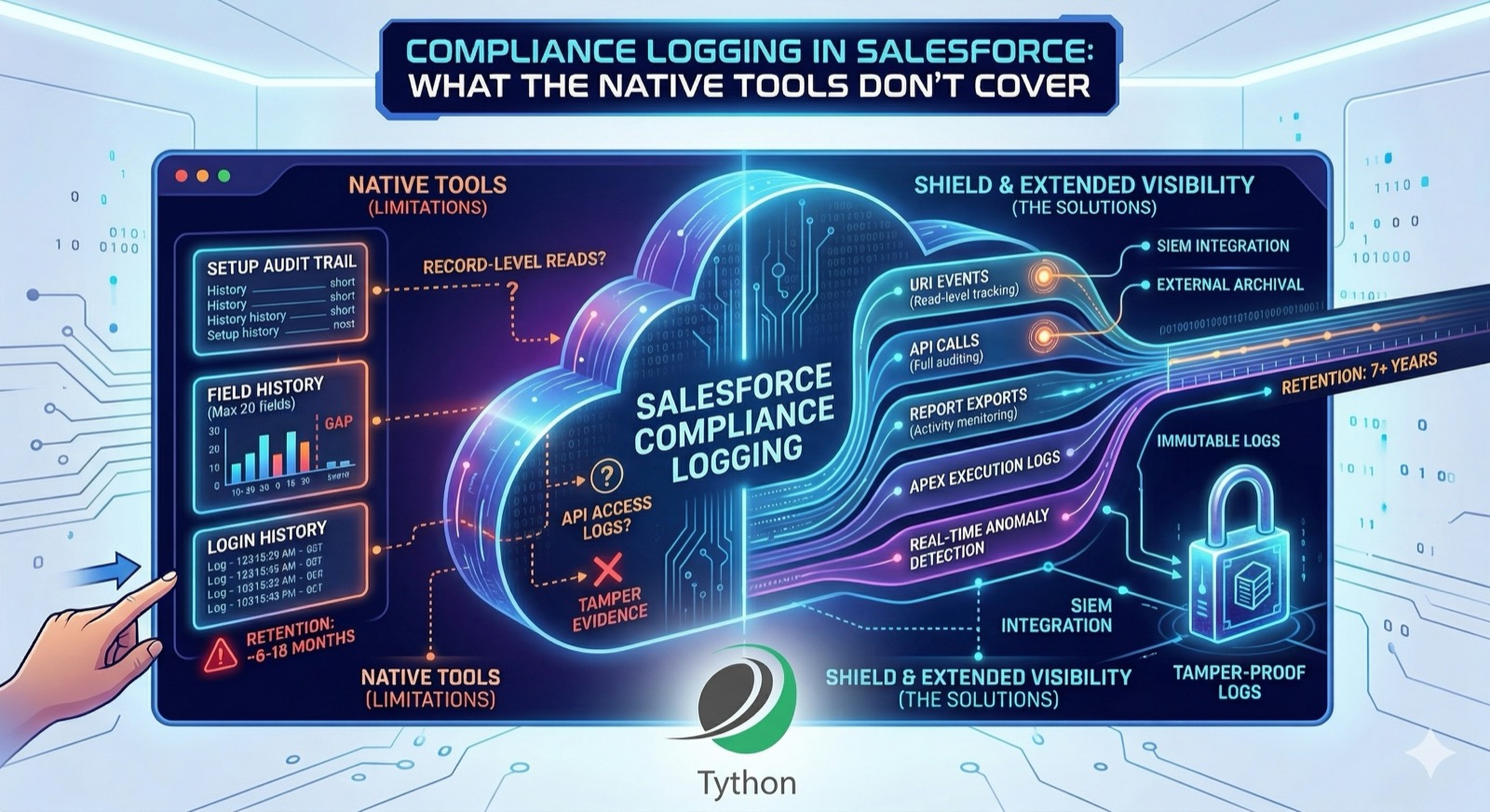
The Three Native Logging Tools
Salesforce provides three built-in audit mechanisms:
- Setup Audit Trail – Tracks changes to org configuration (permission sets, profiles, sharing rules, custom objects, etc.). Retains 180 days in the UI, up to 20 entries per page, and is downloadable as CSV.
- Field History Tracking – Records changes to specific field values on records. Limited to 20 fields per object, with an 18-month (or 24-month via the API) retention window.
- Login History – Logs user login events including timestamp, source IP, login type, and status. Retained for 6 months.
For a small org with straightforward compliance requirements, these may be sufficient. For anything more complex, the gaps become significant.
Where the Gaps Are
Field History Tracking limitations: The 20-field-per-object cap forces you to choose which fields to audit. If a compliance framework requires tracking all changes to records containing protected health information or financial data, 20 fields may not cover it. And once a field is removed from tracking, its historical data isn’t deleted–but no new changes are captured, creating a silent gap in your audit trail.
No record-level read tracking: None of the native tools log who viewed a record. Setup Audit Trail tracks configuration changes. Field History tracks field edits. Login History tracks authentication events. But if a user opens a Contact record containing PII and reads it without making changes, there’s no native log of that access. For HIPAA’s “access to protected health information” requirement, this is a gap.
Retention limits: SOX requires audit data retention for 7 years. SOC 2 typically requires evidence covering the audit period (usually 12 months). Field History Tracking’s 18-24 month window may cover SOC 2, but falls short of SOX requirements. Setup Audit Trail’s 180-day window doesn’t satisfy either without external archival.
No tamper evidence: Native logs have no integrity verification. There’s no hash chain, no immutable ledger, and no way to prove that log entries haven’t been modified or deleted. SOC 2’s CC7.2 (system monitoring) and CC7.3 (anomaly detection) criteria expect evidence that monitoring data itself is protected.
What This Means for Your Compliance Posture
If your compliance program relies solely on Salesforce’s native logging, you likely have gaps in:
- Coverage – Not all access types are logged (reads, API access, report exports)
- Retention – Native retention periods don’t meet long-term regulatory requirements
- Integrity – No mechanism to prove logs haven’t been altered
- Correlation – Native tools don’t cross-reference login events with data access patterns
These aren’t theoretical risks. They’re the questions auditors ask, and “Salesforce doesn’t track that natively” isn’t an answer that satisfies a SOC 2 assessment or HIPAA audit.
Deeper Dive
Compliance-to-Salesforce Logging Matrix
Here’s how Salesforce’s native tools map against common compliance requirements:
RequirementSOXHIPAASOC 2Native ToolGap?Track configuration changesYesYesYes (CC6.1)Setup Audit TrailPartial – 180-day retentionTrack field-level data changesYesYesYes (CC6.1)Field History TrackingYes – 20-field cap, 18-24 month retentionTrack record read accessNoYes (Access logs)Yes (CC6.1, CC7.2)NoneYes – requires Shield Event MonitoringTrack API data accessYesYesYes (CC6.1)NoneYes – requires Shield Event MonitoringTrack report/export activityYesYesYes (CC6.1)NoneYes – requires Shield Event MonitoringTrack login/logout eventsYesYesYes (CC6.1)Login HistoryPartial – 6-month retentionLong-term log retention (7+ years)YesYes (6 years)No (12 months typical)NoneYes – requires external archivalLog integrity/tamper evidenceYesYesYes (CC7.2)NoneYes – requires external SIEMReal-time anomaly detectionNoNoYes (CC7.3)NoneYes – requires Shield or SIEM
The pattern is clear: native tools cover change tracking partially but fall short on read access, API activity, retention, and integrity–areas where compliance frameworks are explicit.
Shield Event Monitoring
Salesforce Shield’s Event Monitoring is the primary way to close the biggest gaps. It captures event log files for over 50 event types, including:
- Login events – Augments Login History with additional context (browser, OS, TLS version, login geo)
- URI events – Tracks page views, giving you read-level access logging
- API events – Logs every API call including the endpoint, user, and source IP
- Report Export events – Captures when users export report data
- Lightning Interaction events – Tracks user interactions within Lightning Experience
- Apex Execution events – Logs Apex class and trigger executions
Event log files are generated daily and retained for 30 days in the standard Event Monitoring add-on. With Shield’s extended retention (the Event Log File add-on), retention extends to 10 years–satisfying even SOX requirements if you keep the data within Salesforce.
Querying Event Logs
Event logs are stored as EventLogFile records. You can query them via SOQL:
SELECT Id, EventType, LogDate, LogFileLength
FROM EventLogFile
WHERE EventType = 'Login'
AND LogDate = LAST_N_DAYS:7
Each EventLogFile record contains a CSV-formatted blob with the event details. To download and inspect:
sf data query --query "SELECT Id, EventType, LogDate FROM EventLogFile WHERE EventType='URI' AND LogDate=TODAY" --target-org myOrgThen use the sf data get record command or the REST API to download the actual log file content.
Real-Time Events
Shield also offers Real-Time Event Monitoring, which publishes platform events as they occur rather than in daily batches. This enables:
- Transaction Security policies that block or require MFA for specific actions in real time
- Streaming event data to a SIEM for live alerting
- Automated responses to suspicious activity (e.g., blocking a session after anomalous data export)
Real-time events are published to the RealtimeEvent platform event channel and can be subscribed to via CometD, Pub/Sub API, or a trigger.
SIEM Integration Patterns
For most compliance programs, the right architecture is Salesforce logging + external SIEM:
Pattern 1: Batch export Pull EventLogFile data daily using the REST API and ingest it into your SIEM. This is the simplest approach and works for orgs that don’t need real-time alerting.
Salesforce EventLogFile → Scheduled API job → SIEM (Splunk, Sumo Logic, etc.)Pattern 2: Real-time streaming Subscribe to Shield’s real-time platform events and stream them directly to your SIEM. This gives you near-instant visibility but requires Shield’s Real-Time Event Monitoring add-on.
Salesforce Real-Time Events → Pub/Sub API → SIEMPattern 3: Change Data Capture Use Salesforce’s Change Data Capture (CDC) to stream record-level changes to an external system. CDC is free (for a limited number of entities) and captures creates, updates, deletes, and undeletes–filling some of the gaps that Field History Tracking’s 20-field cap creates.
Salesforce CDC → Pub/Sub API → External data store / SIEMCDC doesn’t replace Field History Tracking for compliance purposes (it doesn’t capture old vs. new field values in the same way), but it provides a real-time stream of change events that you can store externally with the retention period you need.
Building a Retention Strategy
A practical retention strategy for compliance:
- Keep native tools active. Setup Audit Trail, Field History Tracking, and Login History are free and provide the first layer of evidence. Don’t disable them.
- Export and archive regularly. Before data ages out of native retention windows, export it to an external store:
- Setup Audit Trail CSV export monthly (covers the rolling 180-day window)
- Field History data via SOQL or Data Loader before the 18-month window closes
- Login History via SOQL or CSV export quarterly
- Choose a retention target based on your strictest framework. If you’re subject to both SOC 2 (12 months) and SOX (7 years), build for 7 years. It’s easier to retain more than to reconstruct lost data.
- Store exports in an immutable or append-only system. S3 with Object Lock, Azure Blob with immutable storage policies, or a SIEM with write-once storage. This addresses the tamper evidence gap.
- Document the process. Auditors want to see that you have a defined, repeatable log management procedure–not just that data exists somewhere.
When Shield Isn’t an Option
Shield is a paid add-on, and not every org has the budget. If Shield isn’t available, here are partial mitigations:
- Login Event Streaming: Salesforce offers free login event streaming via the
LoginEventplatform event. It provides real-time login data that you can stream to an external system. - Change Data Capture: Free for up to 5 entities (more with add-on). Provides real-time record change events without Shield.
- Custom Apex logging: You can build custom logging in Apex triggers and classes to capture specific events. This is brittle and increases code complexity, but it’s an option for targeted audit requirements.
- Automated Setup Audit Trail export: Schedule a weekly or monthly export of Setup Audit Trail data to extend your effective retention.
None of these fully replace Shield Event Monitoring, but they can fill specific gaps while you build the business case for the add-on.
The Bottom Line
Salesforce’s native logging tools provide a baseline, but they weren’t designed to meet the full requirements of SOX, HIPAA, or SOC 2 on their own. The gaps–read access tracking, API activity logging, long-term retention, and log integrity–are exactly the areas auditors probe.
The right approach is to understand what your compliance framework specifically requires, map those requirements against what Salesforce provides natively, and close the gaps with Shield, external archival, or SIEM integration. Starting with the compliance matrix above gives you a concrete gap analysis rather than a vague sense that “we should be logging more.”
Book a 15-Minute Security Strategy Call
Reference(s):
https://help.salesforce.com/s/articleView?id=sf.admin_monitorsetup.htm
https://help.salesforce.com/s/articleView?id=sf.tracking_field_history.htm
https://help.salesforce.com/s/articleView?id=sf.real_time_event_monitoring_overview.htm